
SMS opt-in
How owners opt in
KanCraft JobQ Alerts go only to the company's owners, and only after each owner opts in inside JobQ, our in-house production system. There is no public sign-up.
Effective October 12, 2026
Where the opt-in happens
Each owner signs in to JobQ (staff only) and opens Admin, then Security Alerts. There they enter their own mobile number and tick the consent box next to it. JobQ records the consent text, who ticked the box and when. Nobody receives texts until their box is ticked, and changing the number clears the opt-in.
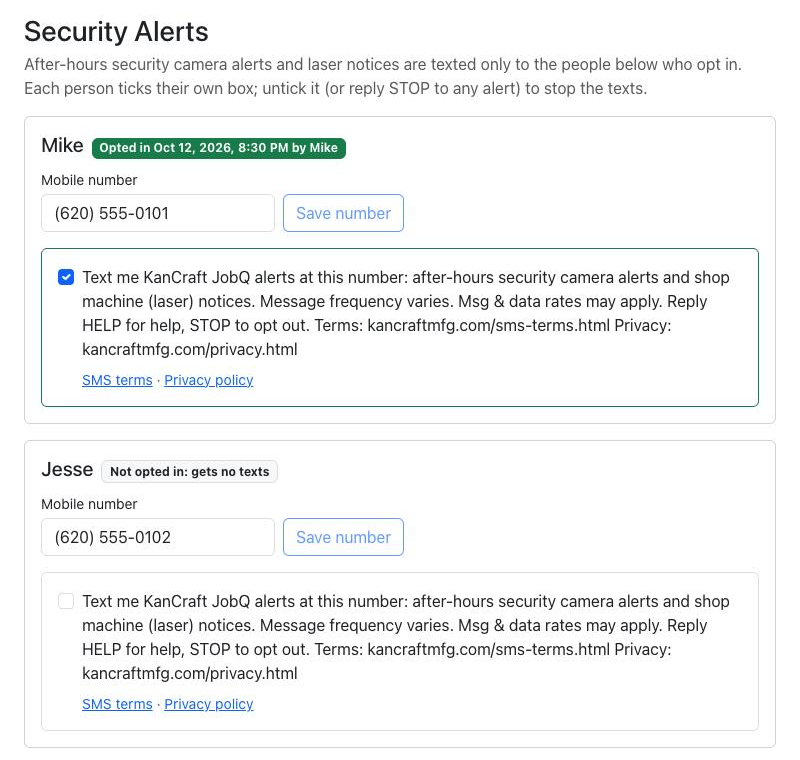
The consent box reads
“Text me KanCraft JobQ alerts at this number: after-hours security camera alerts and shop machine (laser) notices. Message frequency varies. Msg & data rates may apply. Reply HELP for help, STOP to opt out. Terms: kancraftmfg.com/sms-terms.html Privacy: kancraftmfg.com/privacy.html”
After opting in
The first text confirms the enrollment: “KanCraft JobQ alerts: you'll get after-hours security and shop machine alerts at this number. Msg frequency varies. Msg&Data rates may apply. Reply HELP for help, STOP to opt out.”
Opting out
Reply STOP to any message, or untick the box in JobQ. Reply HELP for help.
More
What the program sends is in our SMS terms; how we handle mobile numbers is in our privacy policy.
Contact
KanCraft Metal Fabrication · Girard, Kansas · info@kancraftmfg.com · (620) 249-4026